Point of sale
Food and beverage POS built for golf courses
Partake point of sale runs food and beverage at the clubhouse, the turn, the beverage cart, and events on an iPad or in the browser. Staff open tabs, run tables, split checks, and charge the member account. Cards go through Stripe Terminal, and online orders from the golfer site land on the same screen.
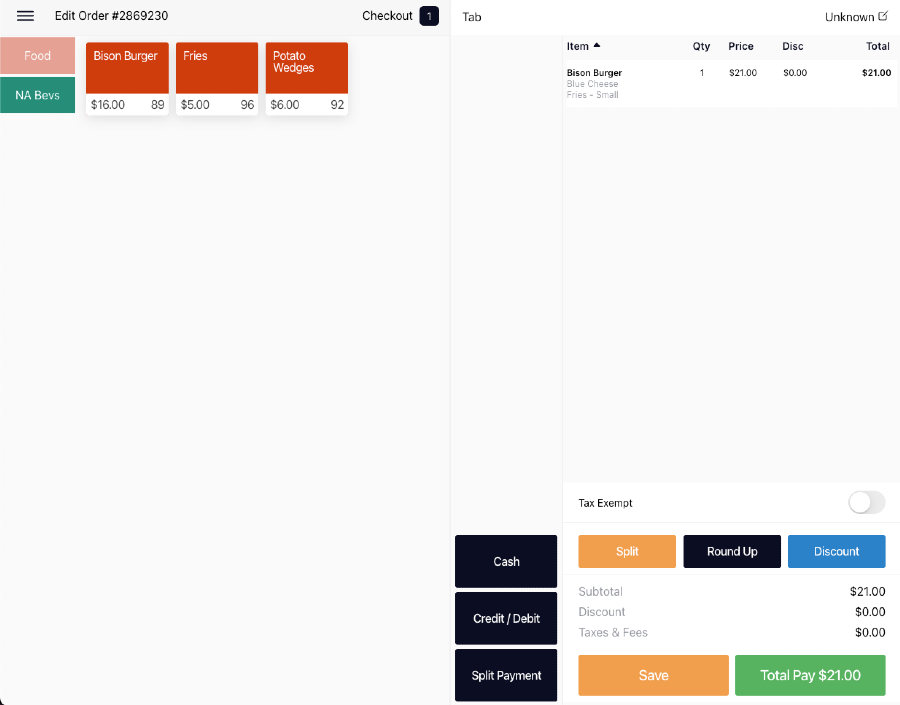
Every way a course serves
The same POS runs the grill counter, the dining room, the turn, the beverage cart, and the banquet.
Pickup, delivery, fast close, tab, table, and event
Six dining modes cover the counter, the dining room, the cart, and banquets.
Runs on an iPad or in the browser
A native iOS app for iPad plus a web version.
Staff roles for cart, pro shop, and starter
Employee types match how a course staffs the day.
Checks the way staff work
Split, adjust, and close the check without leaving the order.
Split checks and seats
Split an order by seat or by item.
Comps, voids, discounts, service charges, and tax exempt
Adjust the check without leaving the order.
Tip prompts, signatures, and receipts
Gratuity on the screen, signature capture, and printed or emailed receipts.
Every tender
Cards run through Stripe. Cash, gift cards, and member charges to Golf365 are on the same payment screen.
Cash, card, card on file, gift card, and split tender
Cash with change due, Stripe card payments, saved cards, and gift cards.
Member charges with member lookup and reciprocal clubs
Look up the member and post the check to their account through Golf365.
Stripe Terminal card readers
Tap, dip, or swipe on a Stripe Terminal reader paired with the POS.
“Automated reports, every payment method known is accepted with ease, and we have real insight and visibility into our operations.”
 Angel Park
Shifts that balance
The beverage cart and the turn count stock in and out, and the shift closes with any discrepancy on the screen.
Open and close shifts
Each shift has its own open, close, and summary.
Stand sheets with opening and closing counts
Count stock at the start and end of the shift and see the discrepancy.
Shift reports on the device
Print or review the shift report before handing off.
Online orders on the same board
Orders golfers place on the course site show up on the POS the staff already use, with where each one is going.
- Online orders on the same board. Accept orders from the golfer site and see where they go: a table, a tee time, an address, or an outpost.
- POS and online orders on one screen. Orders from the golfer site show up next to orders rung in at the counter.
Hardware
The POS runs on an iPad or in a browser, with Stripe Terminal readers and Star Micronics printers.
Devices
iPad
The Partake POS runs as a native iOS app on iPad.
Devices
Web browser
The POS, admin, and tee sheet also run in a modern web browser.
Card readers
Stripe Terminal readers
Card readers from Stripe Terminal pair with the POS for tap, dip, and swipe.
Printers and cash drawers
Star Micronics printers
Receipt and kitchen printing on Star Micronics printers.
Printers and cash drawers
Cash drawers
A cash drawer connected to the Star printer opens on cash payments.
Kitchen
Kitchen screens
A tablet running Partake in kitchen display mode.
Frequently asked questions
- Is Partake a tee sheet, a POS, or both?
- Both. The tee sheet and the food and beverage POS share one guest record, so the golfer who booked the tee time is the same person on the check.
- Which payments does Partake take?
- Partake runs on Stripe: cards online, Apple Pay and Google Pay, cards on file, and Stripe Terminal readers in person. Staff can also take cash and gift cards, and member charges post to Golf365.
- Does the Partake POS work on an iPad?
- Yes. The POS is a native iOS app for iPad and also runs in a web browser.
- Can the beverage cart use Partake?
- Yes. Cart staff sell from the POS on an iPad with a Stripe Terminal reader, count stock on a stand sheet at the start and end of the shift, and receive orders golfers place to their tee time.
- Can staff open tabs and run tables?
- Yes. Tab and table are two of the six dining modes, alongside pickup, delivery, fast close, and event. Tables can be laid out on a floor plan.
- Can we split a check?
- Yes. Staff split by seat or item on the POS. On the golfer site a group can choose Pay my items, Split evenly, or Host covers.
- Can we charge a member’s account?
- Yes. Staff look up the member and post the check to their account through Golf365, including reciprocal clubs.
- Which card readers and printers work with Partake?
- Partake uses Stripe Terminal card readers and Star Micronics receipt and kitchen printers, with cash drawers that open from the printer.
- Does Partake open a cash drawer?
- Yes. A cash drawer connected to a Star Micronics printer opens when staff take a cash payment on the POS.
Related
- Kitchen displayKitchen screens routed by station, with meal courses that fire automatically or on the server’s call.
- Golfer siteA course-branded site on the course’s own domain where golfers book tee times and order food, including to their tee time.
- HardwareiPad, web browser, Stripe Terminal readers, and Star Micronics printers.
- Beverage cart and on-courseGolfers order to their tee time, cart staff sell on an iPad with a Stripe reader, and stand sheets keep the counts honest.
- Private and country clubsMember charges through Golf365, reciprocal clubs, member rates, dining, and the club’s own branded site.